
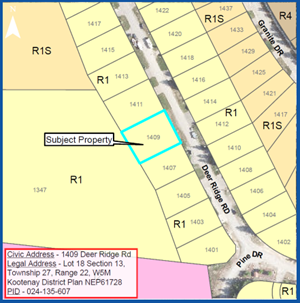
Tree Construction Ltd. has applied for a rezoning in order to allow for a secondary suite in a single detached dwelling that is proposed to be constructed at 1409 Deer Ridge Road. The purpose of Zoning Amendment Bylaw No. 1470, 2022 – Southwood Residence is to rezone the subject property from R1 - Single Detached Residential to R1S - Single Detached With Secondary Residential.
How can I find out more?
View the Southwood Rezoning Staff Report and Bylaw for background information and details (this excludes any correspondence received, see below for Public Hearing submissions).
Background materials are also available at Town Hall from Tuesday, May 31 to Tuesday, June 21 from 10 a.m. to 4 p.m. Monday through Friday.
For more information, contact Colin MacPhee, Planning and Development Technician at 250.344.2271 ext. 240 or colin.macphee@golden.ca.
How can I give feedback?
Anyone who considers themselves affected by the proposed application and wishes to register an opinion may do so by:
Written submission:
By forwarding written submissions for Council consideration (attention of the Communications Official) by:
- Dropping it off at the Town Hall mail slot.
- By post (P.O. Box 350, Golden B.C. V0A 1H0).
- By email to clerk@golden.ca (only emails sent to this email will form part of the Council Agenda).
Any submissions must be received by 12 p.m. (noon) on Thursday, June 16, 2022.
Attend the Public Hearing:
Residents can attend the public hearing in person in Council Chambers or virtually by Zoom webinar on Tuesday, June 21, 2022 at 1:15 p.m.
Joining the virtual Public Hearing
To attend the Public Hearing virtually by Zoom webinar:
- Click the meeting link below to join the virtual Public Hearing on June 21 at 1:15 p.m. Note that the Public Hearing will start following a recess of the Regular Council Meeting.
- Link to join meeting: https://us06web.zoom.us/j/93327695469
- Follow the prompts to download and run Zoom. If required, enter the webinar ID, then click "join the webinar."
- Register with your first and last name.
- When you connect, your microphone will be muted.
If you require assistance in learning how to use Zoom, visit their support page at support.zoom.us.
Speaking at the Public Hearing
Once Mayor Oszust has announced that the Public Hearing is open for public input, please do the following:
- Click the “Raise Hand” icon in the webinar controls. This will notify staff that you have raised your hand and would like to speak.
- When it is your turn to speak, staff will unmute your microphone. Click accept to unmute your microphone. You will not be able to share your video.
- State your name, address, and provide your input and if you are supportive or opposed.
- You will have up to five minutes to speak.
- After all speakers have been heard, the Mayor will call for any additional speakers. If you wish to speak for a second time, please click "raise hand" icon again and wait for staff to unmute your microphone again.